Allegro .brd Viewer Online — Open Cadence Allegro Boards in 3D
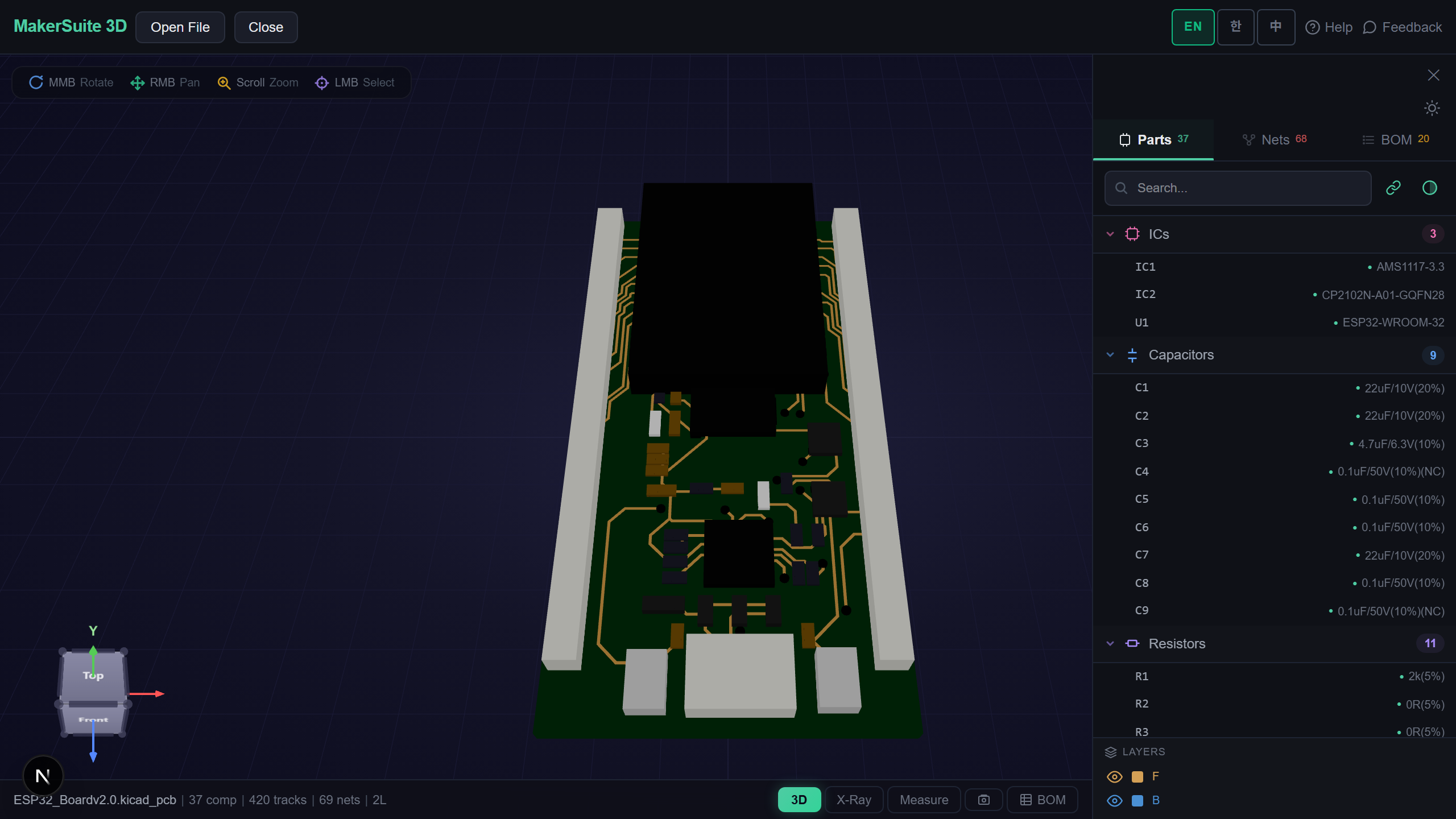
An Allegro Board Without an Allegro Seat
Cadence Allegro is where a lot of serious hardware is laid out — but its .brd file is a binary database that only Allegro, its free viewer for Windows, or a recent KiCad import can read. If you just want to look at a board from a reference design, an open-hardware repository or a colleague, that is a lot to install. MakerSuite 3D now reads Allegro boards directly in your browser.
How to Open an Allegro Board
- Open MakerSuite 3D — no login or installation needed
- Drag the .brd onto the drop zone — Allegro and Eagle boards share the extension and are told apart automatically (a GitHub link works too)
- The board opens in 3D with every copper layer, parts, pads, vias, pours and silkscreen, and the part list on the side
- Use X-Ray, net highlighting, the 2D layer view, measuring, the BOM with live supplier prices, or the DRC and DFM checks as with any other board
Open an Allegro .brd in the browser - no Allegro install needed.
Try MakerSuite 3D FreeWhat the Allegro Reader Handles
- Allegro 16.0 to 17.5 — both generations of the binary layout, in mils or millimetres; tested on boards saved by 16.6 and 17.4
- Parts and pads — placement, rotation and bottom-side mirroring, SMD and through-hole padstacks, plated and unplated holes, slots and custom pad outlines
- Routing — tracks and arcs on all layers, vias with their padstack, and the poured copper with its cut-outs, each on its net
- Silkscreen — taken from the board’s own artwork films, so it shows what the fab would print, including filled logos
Checked Against Allegro’s Own Output
The reader was compared with what Allegro itself exports from the same boards. On a six-layer board saved by Allegro 16.6, all 296 parts, 1,064 pins, 4,251 track segments, 1,146 vias and 308 silkscreen texts land on Allegro’s coordinates. On a second board, saved by 17.4, every pad flash in the top and bottom copper Gerbers sits on a pad, and all 47 holes of the drill file match in position and size. Boards saved by Allegro 18 or newer are not read yet; the viewer says so instead of guessing.
What Is Inside an Allegro .brd
An Allegro board is a database written out as one binary stream: a header with linked-list entry points, a string table, then tens of thousands of objects — nets, padstacks, placed footprints, line and arc segments, shapes, texts — each pointing at others by a numeric key. Objects do not record their own length, so a reader has to know the exact layout of every object type in every release, including the ones it never draws.
MakerSuite walks those lists from the header the way Allegro does: nets lead to their tracks, vias and pours; placed footprints lead to their pads, graphics and texts. Pad positions are stored relative to each footprint and are placed with its rotation and side. Everything happens in your browser; the file is not uploaded.
Frequently Asked Questions
Which Allegro versions open?
Boards saved by Allegro 16.0 through 17.5 (tested on 16.6 and 17.4 boards). Boards from Allegro 18 or newer, and from releases before 16.0, are recognised and get a message instead of a wrong picture.
Do I need an Allegro license or the Allegro viewer?
No. The .brd is read directly in your browser; nothing is installed and the file is not uploaded.
How accurate is it?
It was compared with Allegro's own exports of the same boards: parts, pins, tracks, vias and silkscreen texts land on Allegro's coordinates, and pad flashes and drill holes match its Gerber and drill files.
What about Eagle .brd files?
Eagle uses the same extension. The file itself tells them apart, so drop either one; both open in the same viewer.
Related Articles
Open your Allegro board right now — free.
Open MakerSuite 3D